402flow

Decide what your agents can spend.

Agents can now pay for API calls on their own. 402flow governs those payments. It checks each one against your policy before it goes out, then keeps the record: which agent paid for what, how much, whether the payment settled, and whether the merchant delivered.

When an agent spends money, can you answer these?

The questions below walk through a request step by step, each next to the part of the 402flow record that answers it.

  1. Which agent asked, and was it allowed to?

    Every agent has its own credential, so every request carries a name. Before any money moves, 402flow checks the request against your organization’s default posture and each policy that covers this agent and this merchant. A request that fails stops here with the reason recorded, and nothing is paid.

    Policy decisionpaid request [request id]
    agent
    research-worker
    credential
    [key id]
    org posture
    deny by default
    policy
    [policy name]
    limit
    [daily cap]
    decision
    allowed
    reason
    merchant-scoped budget matched
  2. What did it buy, and what did it pay?

    The record names the merchant, the endpoint, and the amount, along with the protocol, network, and wallet that paid. When more than one of your wallets could pay, 402flow picks one by a fixed rule, so the choice is predictable.

    Paymentpaid request [request id]
    merchant
    demo-merchant
    endpoint
    POST /research-brief/solana-mainnet
    amount
    0.05 USDC
    protocol
    x402
    network
    Solana mainnet
    wallet
    [wallet address]
    transaction
    [signature]
  3. Did the payment settle?

    A successful payment call does not prove the money arrived. 402flow watches the chain separately from the payment attempt. The receipt starts as provisional and becomes confirmed once the transaction reaches finality.

    Settlementpaid request [request id]
    receipt
    [receipt id]
    at payment
    provisional
    after finality
    confirmed onchain
    submitted
    [timestamp]
    confirmed
    [timestamp]
  4. Did the merchant deliver?

    Payment and delivery can fail in different ways, so 402flow records them separately. Here the money arrived and the merchant returned an error. 402flow marks the request as paid but not delivered, and keeps the receipt with it.

    Fulfillmentpaid request [request id]
    settlement
    confirmed
    fulfillment
    failed
    merchant response
    HTTP [status]
    SDK result
    paid_fulfillment_failed
  5. Who follows up, and with what?

    A paid request that was not delivered opens an exception for your operators. It links the request, the payment attempt, the receipt, and the policy decision, so whoever picks it up can chase the merchant or reconcile the spend without searching logs.

    Exceptionpaid request [request id]
    exception
    [exception id]
    state
    open
    linked
    request, attempt, receipt, decision
    next step
    operator review

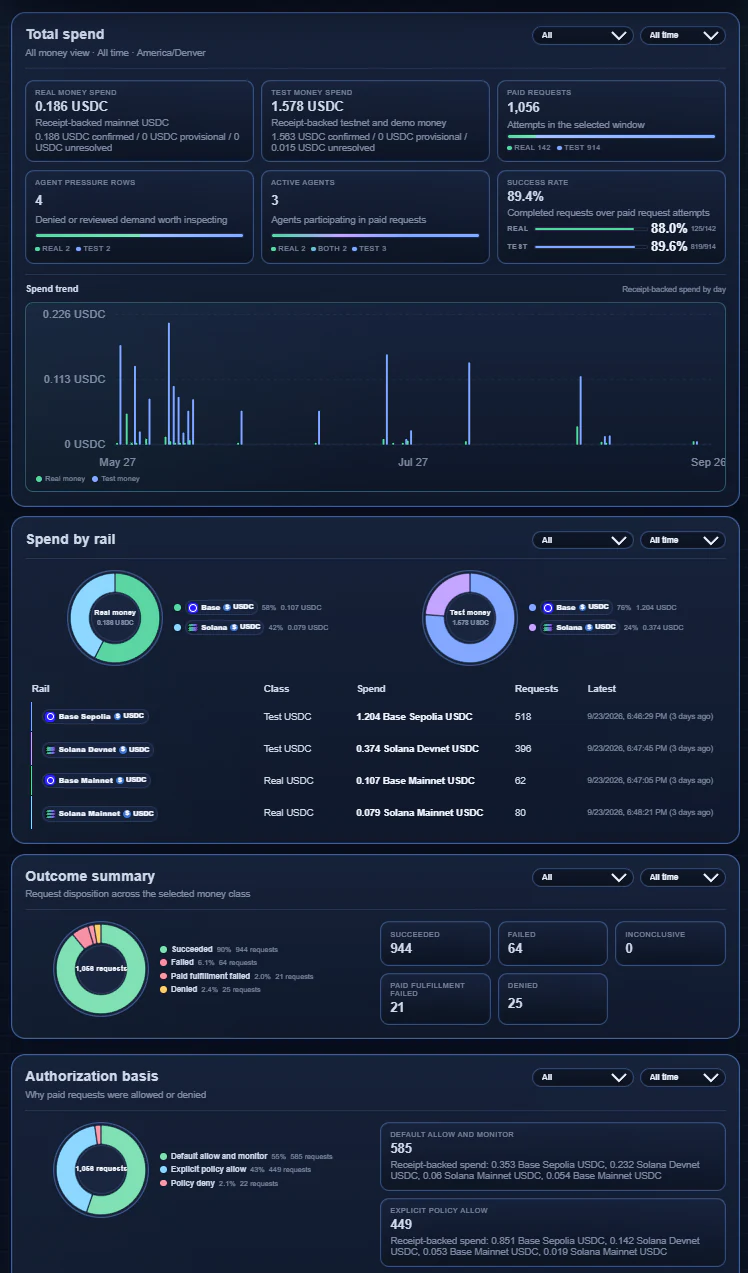
Reports roll these records up by agent, merchant, and network. They show denials with their reasons, and which agents keep running into their limits. Open the live console (opens in a new tab)

The Reports view in the 402flow console: real and test USDC spend, a daily spend trend, spend by network, request outcomes, and why requests were allowed or denied.
Reports in the 402flow console

Three steps to get started.

  1. Give each agent a credential.

    Register the agent in the 402flow console. It gets its own key, and every request it makes is tied to that identity.

  2. Route paid calls through the SDK.

    Swap direct payment code for one SDK call. If policy denies the request, your code gets a typed error with the reason, before anything is paid.

  3. Choose a default posture.

    Start with allow-and-monitor to learn from real traffic, then tighten. Or start with deny-by-default and allow only the merchants and budgets you expect.

TypeScript · @402flow/sdk
import { AgentPayClient, FetchPaidError } from '@402flow/sdk';

const client = new AgentPayClient({
  controlPlaneBaseUrl: 'https://api.402flow.ai',
  organization: 'your-org',
  agent: 'research-worker',
  auth: {
    type: 'bootstrapKey',
    bootstrapKey: process.env.X402FLOW_BOOTSTRAP_KEY ?? '',
  },
});

try {
  const result = await client.fetchPaid(merchantUrl, request, {
    description: 'research brief',
    idempotencyKey: 'brief-2026-09-26',
  });
  if (result.kind === 'success') console.log(result.receiptId);
} catch (error) {
  if (!(error instanceof FetchPaidError)) throw error;
  // 'denied': policy stopped it, nothing was paid.
  // 'paid_fulfillment_failed': paid, not delivered, receipt kept.
  console.log(error.kind, error.reason, error.receiptId);
}

Agents that build their own requests can use a three-tool flow instead: prepare, execute, and read the result. Payment can also be handed to Dexter or pay.sh. Read the SDK

What works today.

402flow is pre-launch. This is what a pilot can use now.

402flow capabilities available today
Protocolx402L402 and MPP are planned
NetworksBase and Solana, mainnet and testnetTempo is planned, for MPP
AssetUSDC
Policy scopeOrganization, agent, or merchant
LimitsPer request, or per day, week, or month
Default postureAllow and monitor, or deny by default
SettlementConfirmed onchain after finality
RecordsReceipts, audit log, exceptions, reports
IntegrationTypeScript SDK (Node 20+) and hosted console
Payers402flow, Dexter, or pay.sh

We’re looking for teams to run a pilot.

We’d rather prove 402flow on one of your workflows than describe it here.

A pilot runs for up to 60 days on one agent workflow that pays for APIs. It can stay in a test or controlled payment environment. Production and mainnet spend happen only if both sides agree. We help set up agent credentials, wallets, and policies, and we meet once a week. There’s no software fee. Each side covers its own engineering time and network costs.

You bring one technical owner and one representative workflow. At the end, we write up what worked, what didn’t, and what production would take.

The 402flow team